Add a Custom Token
After adding Bitgold Mainnet, Binance Wallet shows only the native BTG. This page imports a token issued on Bitgold, using its contract address.
Who this is for
You received a token on Bitgold that Binance Wallet does not list. Skip this page for BTG itself: BTG is the native coin, not a token, and does not need a contract address.
Before you start
- The token's contract address from the issuer's official site or documentation. A chat message, a comment, or a "support" account is not a source.
- The symbol and precision (decimals) from the same source. Binance Wallet usually fills them from the contract, but you should still compare.
- Bitgold Mainnet selected. A token imported on another network will not show a Bitgold balance.
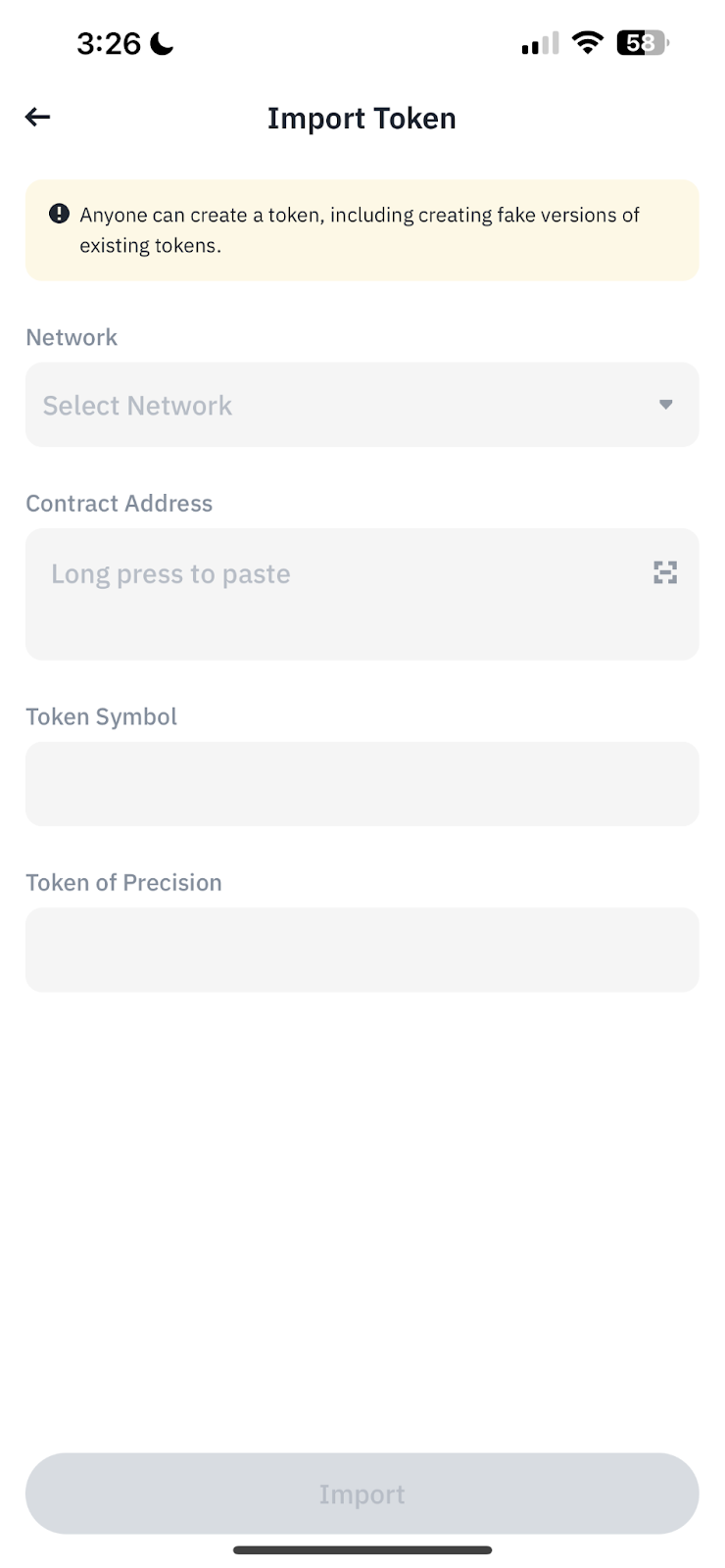
Steps
1. Open Manage Tokens
In the app, open Assets, scroll to the token list, and tap Manage Tokens. In the extension, open the token list and use the add-token control.
2. Add a token
Tap the + or Add Token control, then choose the manual or custom-token option. Do not pick from a suggested list; a suggested token is not a recommendation.
3. Choose Bitgold and paste the address
Select Bitgold Mainnet as the network, then paste the contract address from your official source. Compare the address character by character. A copycat contract can use the same name and symbol as the real token.
4. Confirm symbol and precision
Binance Wallet should fill Token Symbol and Token of Precision from the contract. If either differs from the official source, stop: the address may belong to a different contract.
5. Import and check the row
Tap Import. The token appears in the asset list with a balance. Open its details and confirm the contract address matches your source.
Importing is a local display action. It sends no transaction, spends no gas, and does not create or transfer value.
Verify it worked
- The token row shows the expected symbol and amount.
- The contract address in the token details matches the official source exactly.
- The token's page on www.bitgold.live lists the same contract and balance for your address.
- Switching accounts hides the token, because tokens are tracked per account.
Troubleshooting
| Problem | What to do |
|---|---|
| The token does not appear | Check that Bitgold Mainnet is selected and the contract exists on chain 618. A testnet token will not appear on mainnet. |
| The symbol or precision differs | Remove the token and re-add the verified address. Matching letters do not prove the same contract. |
| A token you never bought appears | Anyone can send a token to any address. Do not open links in its name, trade it, or approve it; see Fake Token Scam. |
| The balance shows but the token cannot be sold | The contract may block transfers or charge a tax. Treat it as a fake until the issuer's official documentation proves otherwise. |
| The import button stays disabled | The contract address may be invalid for the selected network. Recheck the address and that Bitgold, not another chain, is selected. |
Next steps
- Send and Receive BTG — move the native coin, not the token.
- Sent on the Wrong Network? — what to do when a token or coin lands on another chain.