Add Bitgold Network
After this page, TokenPocket will list Bitgold Mainnet, show BTG, and open your address in the Bitgold explorer.
Who this is for
TokenPocket users who have a wallet and need to add chain ID 618. Skip this page if Bitgold Mainnet is already in the network list and your BTG balance is correct.
Before you start
- TokenPocket installed from an official source, with the recovery phrase backed up. If not, start with Download TokenPocket.
- The network values below. You can add an empty wallet; to confirm the connection with a balance, the address needs BTG, or you can compare it with the explorer.
- A working internet connection. A VPN or a corporate network can block an RPC endpoint.
- TokenPocket is an example client; the same five values work in any EVM mobile wallet.
Network fields
| Field | Value |
|---|---|
| Network name | Bitgold Mainnet |
| RPC URL | https://mainnet1.bitgold.network |
| Chain ID | 618 |
| Currency symbol | BTG |
| Block explorer URL | https://www.bitgold.live |
Testnet is a separate profile
Testnet uses chain ID 617, symbol tBTG, RPC https://testnet1.bitgold.network, and explorer https://testnet.bitgold.live. Add it as a second network, not as an edit of mainnet.
Steps
1. Open the network selector
From the wallet home screen, tap the current network name, usually shown at the top. If your version does not open a list there, look for Networks under Settings. Menu labels vary by version, so follow the concept rather than the exact wording.
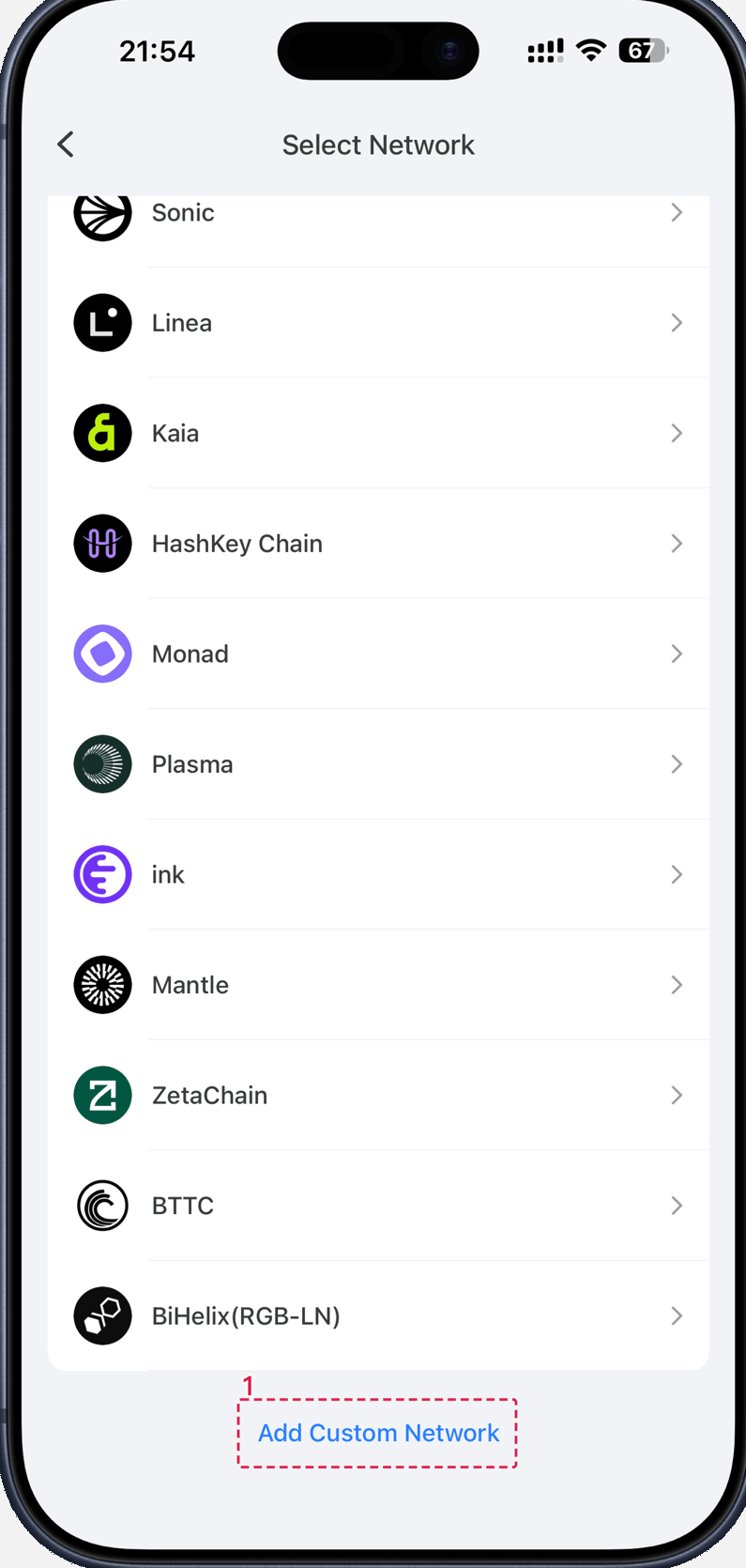
2. Choose Add Custom Network
Select Add Custom Network, or Add Network in versions that use the shorter label. The form asks for the same five values as the table above.
3. Fill in the five fields
Paste the RPC URL with its https:// prefix and no trailing space. Enter 618 as the chain ID; if the form asks for hexadecimal, use 0x26a.
Type BTG as the symbol and the explorer URL in full. The network name is only a label, but keep it recognizable because you will see it whenever you switch chains.
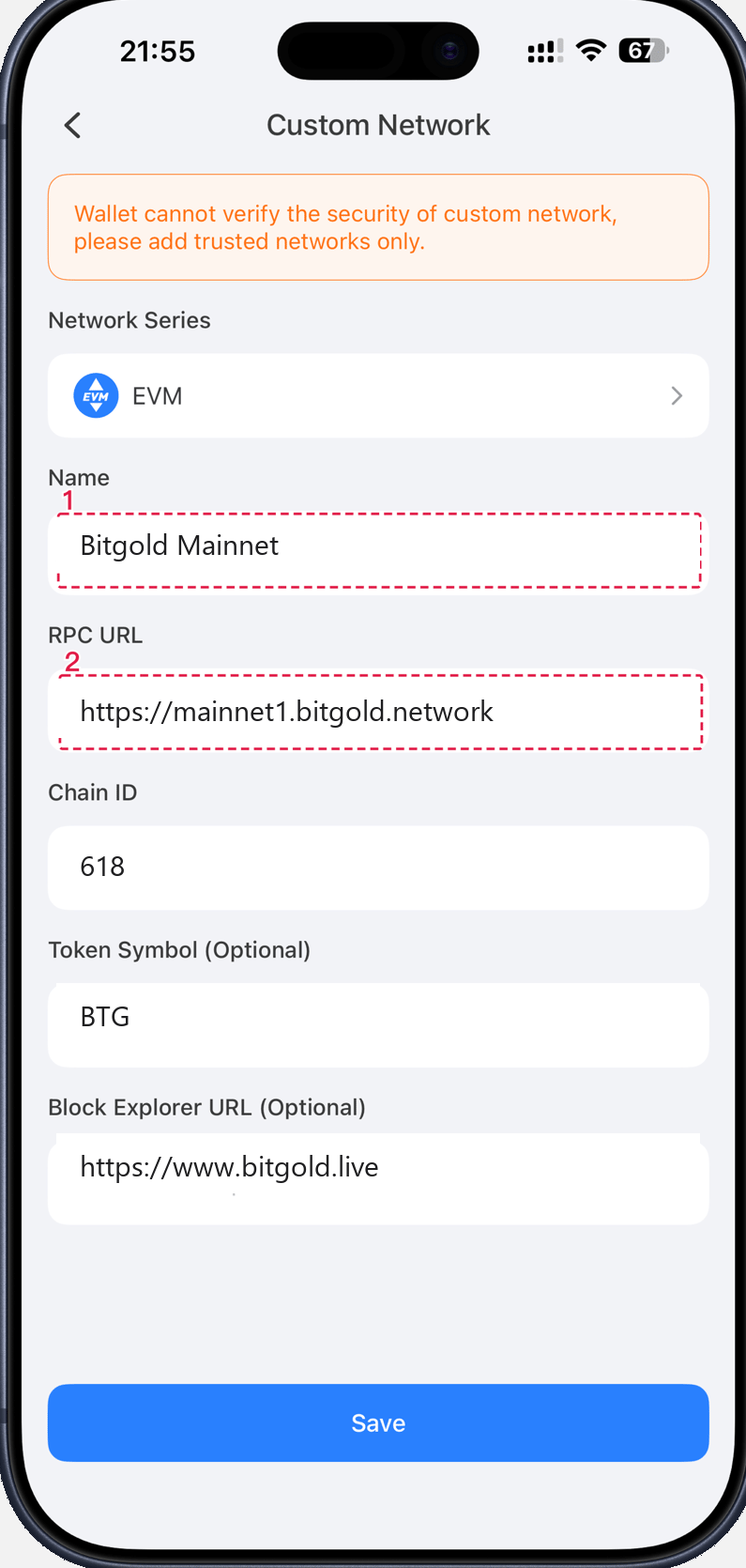
4. Save and switch to Bitgold
Save the profile, then select Bitgold Mainnet from the network list. Return to the wallet home screen and check the header before you do anything else.
Verify it worked
- The header or network selector shows Bitgold Mainnet and chain ID
618. - The asset list shows BTG, with a balance that matches the address on www.bitgold.live. An empty address correctly shows
0. - The explorer link in the network settings opens the same address you see in the wallet.
- If you tap Receive, the address is unchanged from before you added the network.
Troubleshooting
| Problem | What to do |
|---|---|
| "Chain ID already exists" | Bitgold is already configured. Open the existing entry, compare its RPC with the table, and edit it instead of adding a duplicate. |
| "RPC URL invalid" or the balance never loads | Check for a missing https://, a trailing space, or a typo in mainnet1. Try mainnet2 through mainnet6, then check your connection. |
| The network loads but the balance is zero | Confirm the chain ID is 618, then look up the address in the explorer. If the explorer also shows zero, this address holds no BTG. |
| The symbol or amount looks wrong | The symbol is a label; the coin uses 18 decimals and most wallets fix that. If the amount still disagrees with the explorer, remove the profile and add it again. |
| A transaction went out on another network | Stop and identify the chain before sending anything else. Sent on the Wrong Network? (TokenPocket) explains the realistic paths. |
Next steps
- Add a Custom Token (TokenPocket) — import a token that does not appear automatically.
- Sent on the Wrong Network? (TokenPocket) — what to do if a transfer used the wrong chain.
- What Is a Custom Network? — the meaning of each field you entered.